Weather
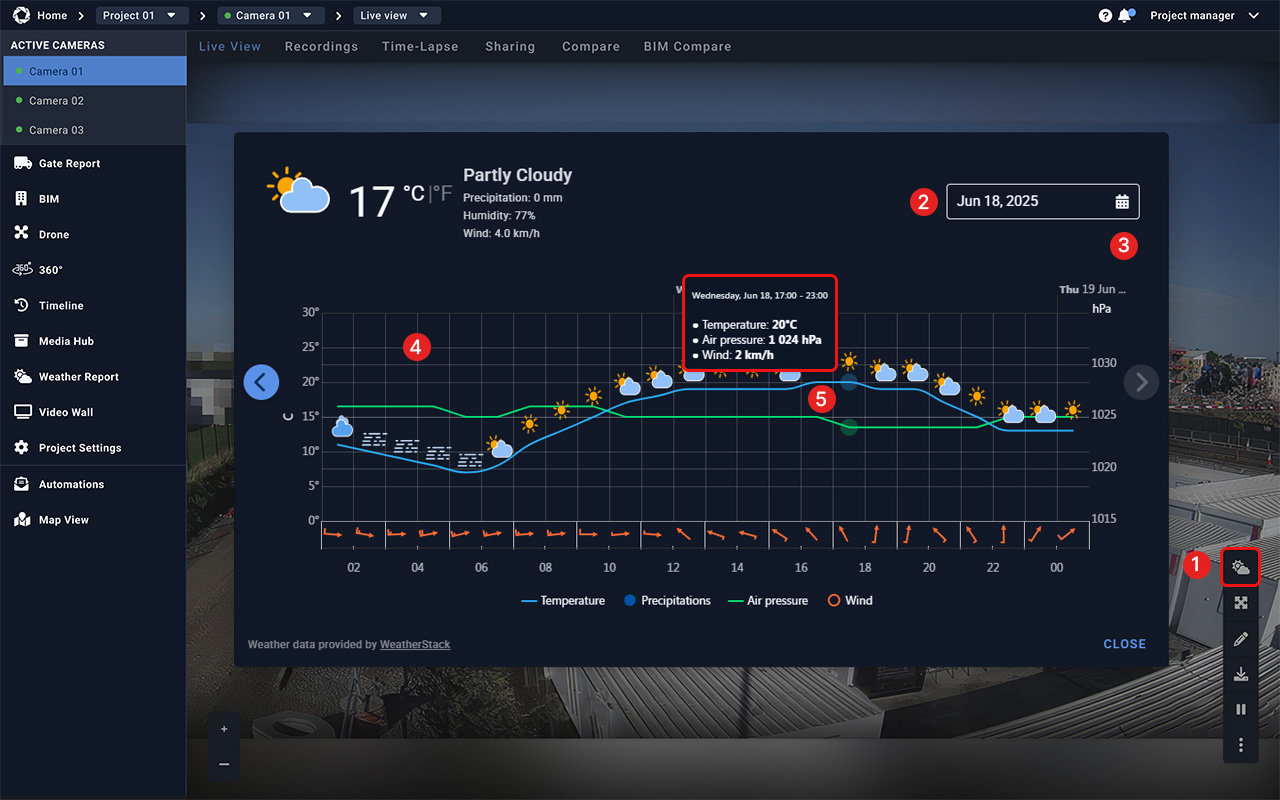
Weather is a tool within the Evercam platform that displays current weather conditions for the camera location. Available directly in the interface, it helps users understand environmental conditions at the site while reviewing footage.

How to Use the Weather Tool
- Click the Weather icon in the bottom right corner of the screen.
- Available from the following views:
- Select a Date
- Live View
- Recordings
- Drone View
- BIM View
- Timeline
- Use the panel to select:
- Today’s conditions
- Tomorrow’s forecast
- Historical data
- Review Key Weather Metrics
- Review the following hourly data:
- Temperature (switch between °C/°F)
- Rainfall (precipitation levels)
- Wind speed & direction
- Air pressure
- Humidity
7. Use Weather Data for Smarter Decisions
8. Compare weather metrics with live or recorded site images.
9. Use timestamped conditions to document weather-related delays.
Apply insights to reschedule risky activities like concrete pouring, lifting, or exterior work.
Access the Weather Tool
Read the full guide in our User Manual.
[[cta]]