Object Detection
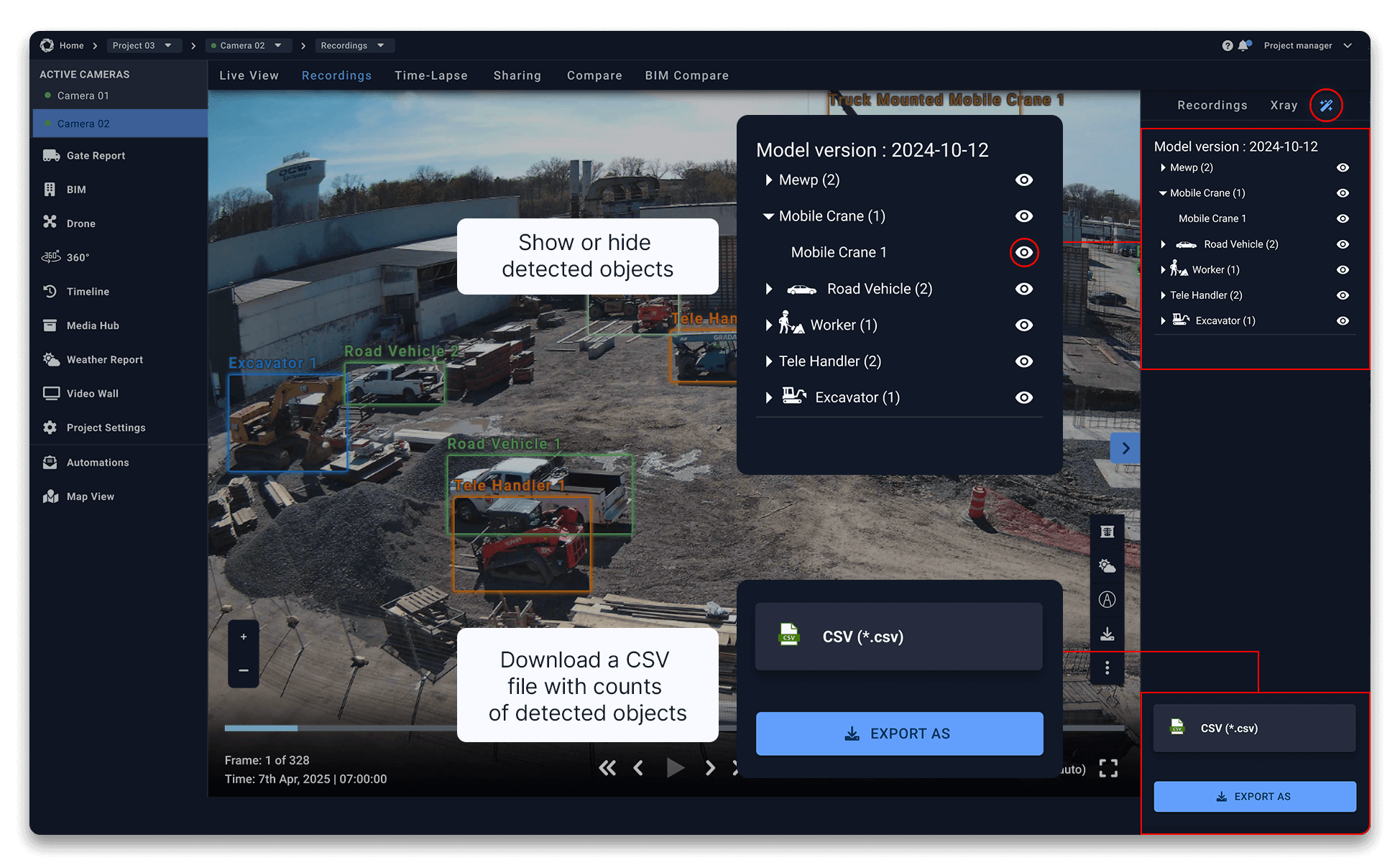
The AI-powered Object Detection tool automatically identifies workers, vehicles, and construction machinery in recorded footage. Accessed via the Magic Wand within Recordings, it highlights and counts key objects in each image, supporting site activity tracking, safety verification, reporting, and clear operational insights without manual review.
How to use Object Detection
- Select the camera
- Navigate to the Recordings tab
- Click on the Magic Wand icon in the top right of your dashboard
- Select Object Detection from the dropdown menu
- Choose Object Detection to activate object recognition
- Detected objects will be outlined with coloured boxes:
- Toggle Object Detection on/off to compare the original vs. detection overlay
Save or Share the Enhanced Image
- Click the Download button to save the improved image.
- Share it directly with stakeholders for better collaboration.
Need More Details?
Read the full guide in our User Manual.
[[cta]]