Gate Report
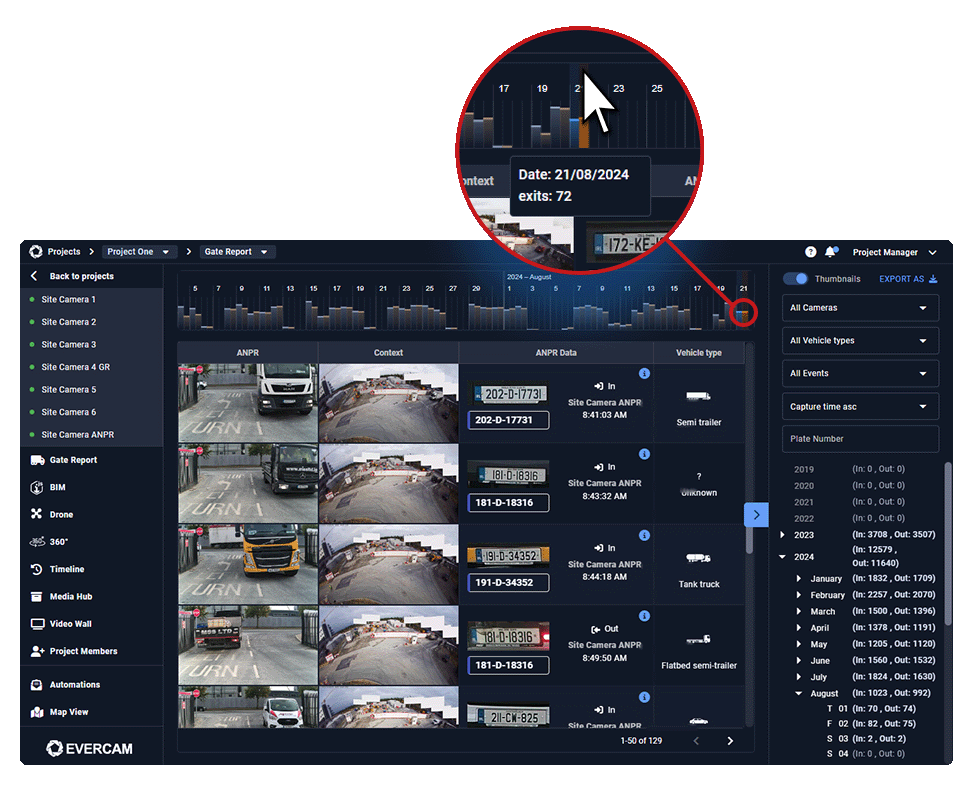
Gate Report is a feature within the Evercam platform that automates the tracking of vehicles entering and exiting a site. Using ANPR (Automatic Number Plate Recognition), it captures license plate data and timestamps for each vehicle movement, providing visual verification of site access and supporting delivery and logistics tracking without manual logs.

How to Use the Gate Report
- Navigate to the Gate Report tab in the dashboard.
- Select the camera monitoring the site entrance.
- The report lists all vehicles detected, including timestamps.
- Click on an entry to view recorded footage of the vehicle.
- Use filters to find specific dates, times, plate numbers, or vehicle types.
- Compare logs with project schedules for verification.
Export & Share Reports
- Click Download to save a report as a CSV or PDF for record-keeping.
- Share with stakeholders for tracking deliveries and site access.
Need More Details?
Check the full guide in our User Manual.
[[cta]]