
Contact us

Thank you! Your submission has been received!
Oops! Something went wrong while submitting the form.

Evercam Play for iOS

Evercam Play for iOS is an open source project, the source code is available on Github. Suggestions and/ or bug reports welcome.

Instructions
If you intend to use this component with Finsweet's Table of Contents attributes follow these steps:
  1. Remove the current class from the content27_link item as Webflows native current state will automatically be applied.
  2. To add interactions which automatically expand and collapse sections in the table of contents select the content27_h-trigger element, add an element trigger and select Mouse click (tap)
  3. For the 1st click select the custom animation Content 27 table of contents [Expand] and for the 2nd click select the custom animation Content 27 table of contents [Collapse].
  4. In the Trigger Settings, deselect all checkboxes other than Desktop and above. This disables the interaction on tablet and below to prevent bugs when scrolling.

Table of contents

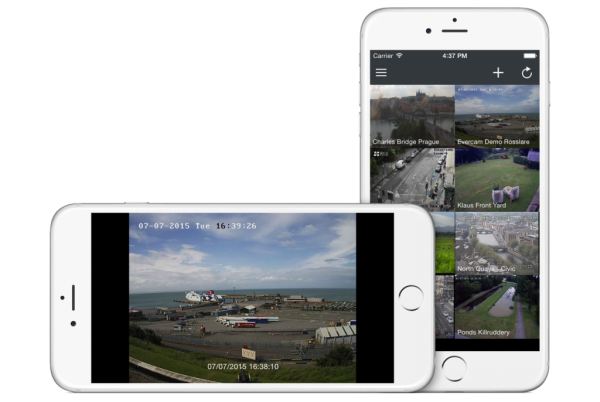
Our iOS app � Evercam Play is now ready for downloading on the App Store, it�s available on iPhone 4/4s/5/5s/6/6s and iPad:

Download on the app store image

Features:

  • Supports a huge range of different camera types � business & residential CCTV, home & business WiFi security cameras, public webcams
  • Add, edit and remove cameras from your account
  • Pre-populates camera details based on vendor
  • Portrait and Landscape viewing
  • Save snapshots from any camera and share them with your friends & family
Evercam Play for iOS

This version works for JPG view only, we will add RTSP support in the next release.

Evercam Play for iOS is an open source project, the source code is available on Github. If you have experience developing with iOS and IP cameras, we are happy to see your pull requests!

All functionalities are using the Evercam REST API and the Objective-C wrapper.

Suggestions and/ or bug reports welcome.

PUBLISHED ON
July 7, 2015
CATEGORY
Blog