
Contact us

Thank you! Your submission has been received!
Oops! Something went wrong while submitting the form.

PTZ functionality goes live in time for FunctionalKats 2015 Dublin

KatsConf 2015 is on tomorrow in Dublin and at 11:30 there�ll be a talk from Jose Garcia-Sacristan with insights into how he made it possible using the Phoenix Framework.

Instructions
If you intend to use this component with Finsweet's Table of Contents attributes follow these steps:
  1. Remove the current class from the content27_link item as Webflows native current state will automatically be applied.
  2. To add interactions which automatically expand and collapse sections in the table of contents select the content27_h-trigger element, add an element trigger and select Mouse click (tap)
  3. For the 1st click select the custom animation Content 27 table of contents [Expand] and for the 2nd click select the custom animation Content 27 table of contents [Collapse].
  4. In the Trigger Settings, deselect all checkboxes other than Desktop and above. This disables the interaction on tablet and below to prevent bugs when scrolling.

Table of contents

KatsConf 2015 is on tomorrow in Dublin and at 11:30 there�ll be a talk from Jose Garcia-Sacristan with insights into how he made it possible using the Phoenix Framework.

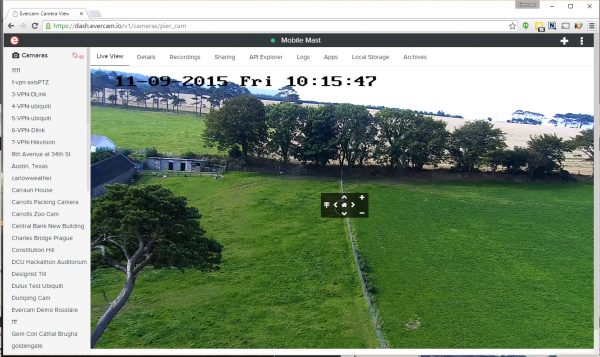
Nicely implemented on the dashboard by Azhar:

PTZ on Evercam Dashboard showing Pan Tilt Zoom and Presets

And on mobile by Liuting:

Good work � let�s explore.

PUBLISHED ON
September 11, 2015
CATEGORY
Blog